For the fundamentals behind this workflow, start with Adobe Premiere Pro markers: the complete guide.
Select the exact audio clips to analyze
Select one or more audio clip items in the active timeline. Video items and unselected audio are ignored. Selected audio inside visible nested sequences is supported, including trimmed, retimed, and reversed clips.
Analysis reads only the visible selected source ranges. A shared source can appear in more than one timeline occurrence, so the final review explains that source markers may be visible elsewhere.
Analyze clap-like transients locally and offline
Choose Conservative, Balanced, or More candidates. Analysis stays on this computer and checks only the selected audio ranges. Temporary analysis files are removed when the search finishes.
Audio is not uploaded. The candidate score ranks clap-like transients from 0 to 100; it is not a probability.
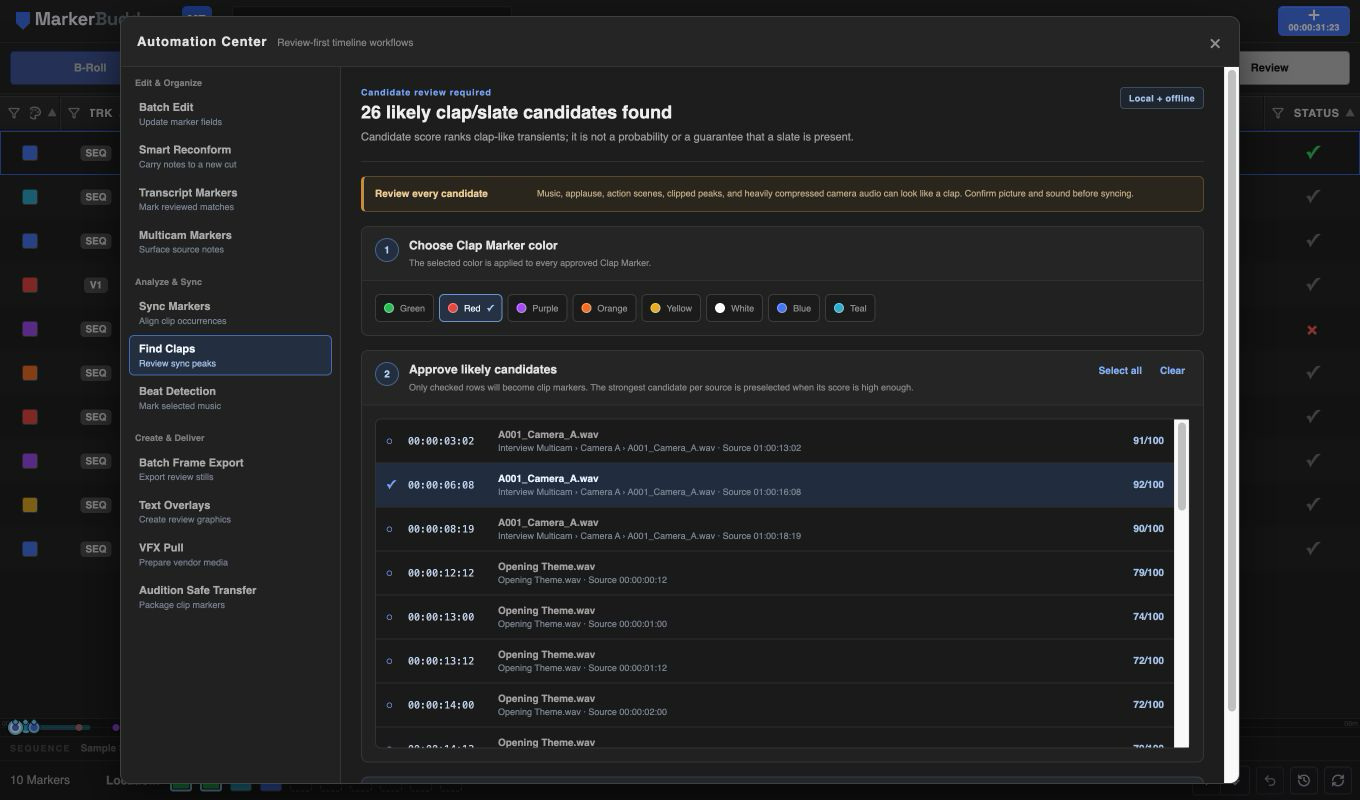
Review false-match risks before adding markers
Clean production audio can work extremely well, but music, applause, action scenes, clipped peaks, and heavily compressed camera audio can produce false matches. MarkerBuddy presents every result as a likely clap/slate candidate for review.
Only the strongest high-scoring candidate per source is preselected. Compare each checked row with picture and production sound, and choose one of MarkerBuddy's eight marker colors before applying.
Approved rows become point clip markers named Clap Marker. Each comment begins with Clap @ and includes the source timecode. The candidate review remains the place for camera-sync judgment and any analysis warnings.
Workflow
A practical four-step process
-
01
Select production audio
Select only the camera or recorder audio clip items whose visible ranges should be analyzed.
-
02
Choose sensitivity, color, and analyze
Pick Conservative, Balanced, or More candidates, choose the Clap Marker color, and run the completely local analysis.
-
03
Review every likely candidate
Compare each ranked transient with picture and sound, clearing music, applause, action, clipping, and compression false matches.
-
04
Add approved source markers
Write only the checked likely candidates to the underlying audio sources, then verify them before syncing cameras.
Before delivery
Review likely candidates before camera sync
Music, applause, action, clipping, and heavy compression can resemble a clap. MarkerBuddy ranks likely candidates and preselects only a strong source winner; compare each selected row with picture and production sound before applying markers or syncing cameras.
