MarkerBuddy Lite
Includes the main marker panel, customization, and a checklist for tracking notes.
Free
Try MarkerBuddy LiteMarkerBuddy 1.7.0 · Marker management and automation for Adobe Premiere
Search, filter, and edit your markers in a panel built for your Premiere workflow. Track feedback, jump to the right moment, and automate repetitive work like imports, batch edits, and reconforms.
More useful markers. Less repetitive work.
New in 1.7.0: subclips, track presets, audio handoff, and a quick tour.
$49.99 · One-time purchase
No subscription · Premiere 25.6 minimum · 26.3+ recommended · macOS + Windows
Learn more about working with markers in Adobe Premiere Pro

"I cut television for a living. When I was moved from Media Composer to Premiere, marker handling was what I missed most - colors, naming, batch editing, and a real workflow for client notes. Nothing filled the gap, so I built it. MarkerBuddy is the answer to what post professionals need in Adobe."
Paste a timecoded note pass. Review detected notes, correct or exclude entries, and apply an offset when needed. Import the batch, then start addressing feedback. MarkerBuddy Undo can roll back the import as one operation.
Flexible timecodes. Read notes with minutes-only times, "ish" approximations, dots instead of colons, or timed note blocks. Check the detected times before importing.
TC offset built in. Notes taken against a 01:00:00:00 export? Shift every imported timecode by ± HH:MM:SS:FF in one field.
Fully undoable. Every import is one entry in MarkerBuddy's own undo history. A bad paste is one click from gone.
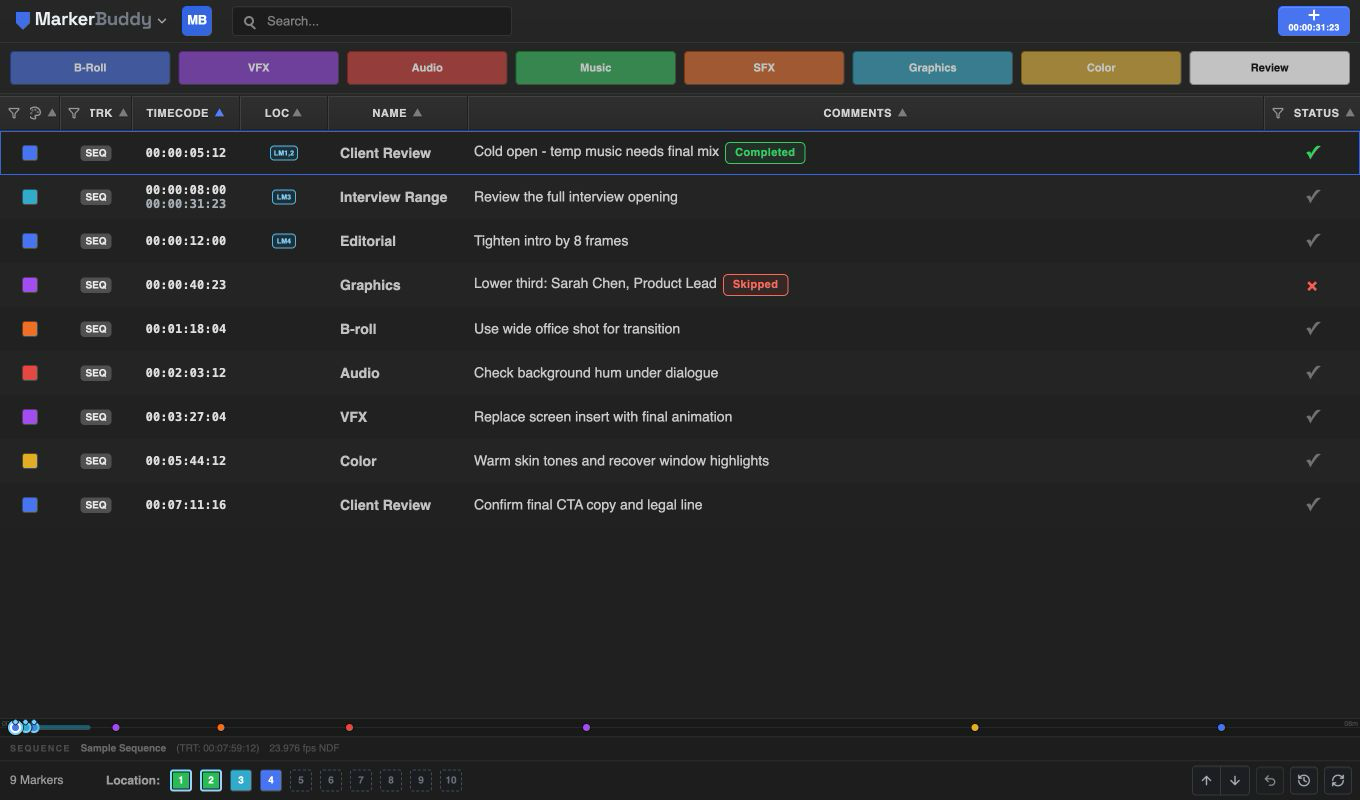
Edit names, comments, colors, and timecodes right in the table, one marker at a time or in batches. Search, filter, or sort sequence and clip markers, then mark notes Pending, Completed, or Skipped. Keep Quick Markers, Location Memories, and Stream Deck within reach as you edit. Move markers between available video and audio tracks, or switch between clip and sequence markers, from the track menu.
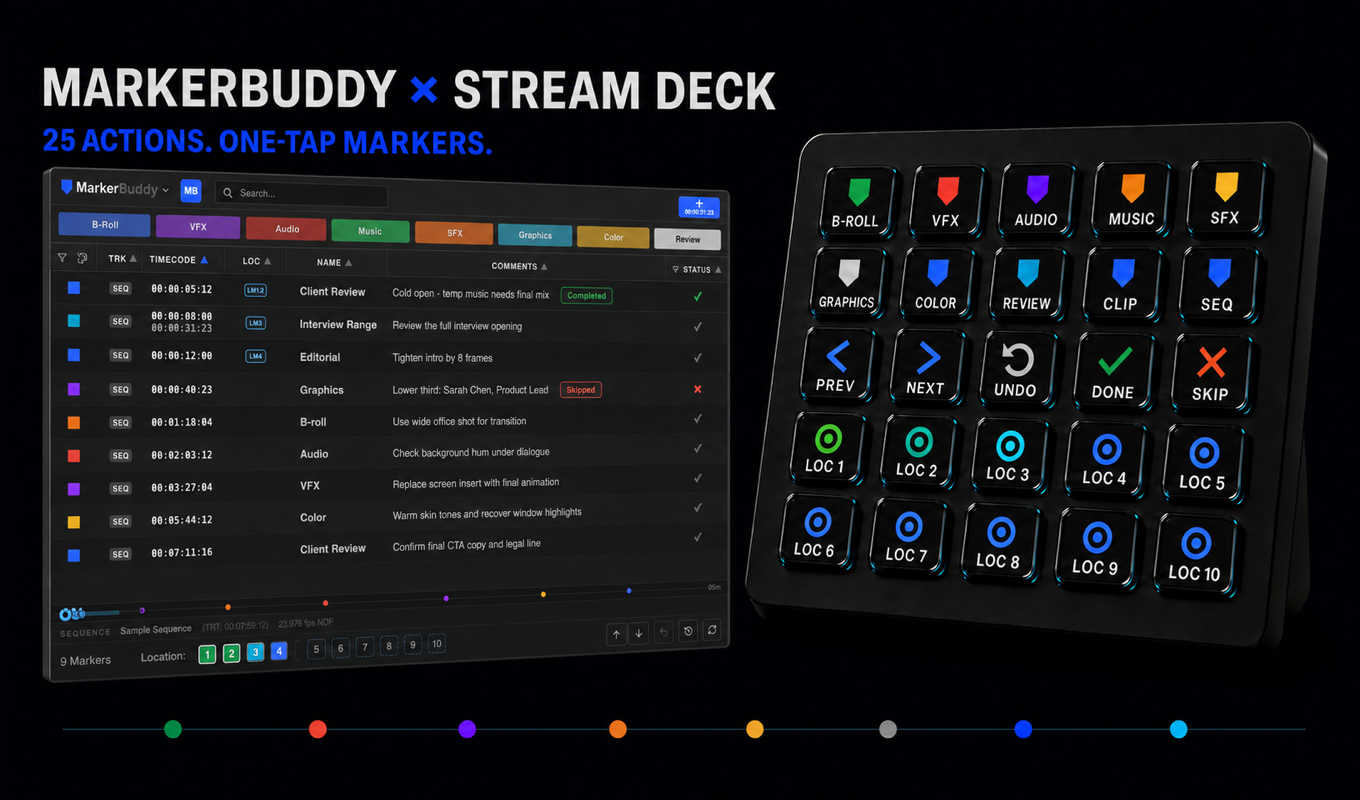
The shipped Quick Marker keys show B-Roll, VFX, Audio, Music, SFX, Graphics, Color, and Review in their factory colors. Add marker, navigation, Undo, status, and Location Memory 1-10 actions complete the 25-key set; all ten Location Memory faces use the same blue bullseye. Customized Quick Marker values do not live-update the static key artwork. The integration stays local, with no cloud bridge or account.
See what each edition includes. A green check means included, a yellow marker shows a Lite limit, and a gray minus means the feature is not available in Lite. Point to a question mark, or focus it with the keyboard, for a quick explanation.
Includes the main marker panel, customization, and a checklist for tracking notes.
Free
Try MarkerBuddy LiteIncludes everything in Lite, plus note and marker imports, 21 export formats, Automation Center access, Stream Deck integration, workflow accelerators, and companion panels.
$49.99One-time purchase
Get MarkerBuddy| Feature | MarkerBuddy Lite Free | MarkerBuddy Paid · one-time purchase |
|---|---|---|
| Edition & requirements | ||
| Price Lite is free. Full MarkerBuddy is a paid, one-time purchase through Adobe Marketplace. | Free | One-time purchase |
| Premiere version Both editions require Adobe Premiere 25.6 (26.3+ recommended) or later and install as UXP plugins. | ||
| macOS support Both editions run in supported Adobe Premiere 25.6+ (26.3+ recommended) installations on macOS. | ||
| Windows support Both editions run in supported Adobe Premiere 25.6+ (26.3+ recommended) installations on Windows. | ||
| Offline / secure operation Marker editing and analysis run locally. Neither edition uploads marker, media, transcript, or client-note data for processing. | ||
| Private marker data Markers, notes, and imported content stay on the editor’s computer unless the editor deliberately exports or shares them. | ||
| Cloud account inside the plugin No MarkerBuddy cloud account is required to use either edition after Adobe Marketplace installation. | ||
| Core marker panel | ||
| Main marker table View sequence and clip markers together with color, track, timecode, name, comments, and status. | ||
| Add clip & sequence markers Add a clip marker to the eligible clip under the playhead or a sequence marker when the workflow requires one. | ||
| In / Out range markers Create a ranged sequence marker from Premiere’s current In and Out points. | ||
| Edit marker details Edit marker name, comments, palette color, timecode, duration, and completion state. | ||
| Multi-select & delete Select one or many marker rows and delete the selection as one undoable operation. | ||
| Search, filter & sort Search marker text, filter by color, track, or status, and sort the visible table. | ||
| Copy & paste markers Copy markers as readable tab-separated text and safely paste MarkerBuddy markers across compatible sequences. | ||
| Marker status Both editions use Completed, Pending, and Skipped status, with unfinished markers labeled Pending in the menu and filter. | ||
| Marker navigation | ||
| Mini Timeline See marker positions across the active sequence and click timeline cues to navigate. | ||
| Column settings & presets Resize, reorder, show, or hide columns and save reusable table-layout presets. | ||
| Undo Reverse MarkerBuddy operations such as imports, pastes, deletes, edits, and Location Memory changes. | ||
| History Open the chronological history and roll back one or several MarkerBuddy operations. | ||
| Add Marker defaults & presets Configure the default name, comment, color, and marker type used by the Add Marker button. | ||
| Auto-Rescue Clip Markers Full MarkerBuddy safely restores uniquely verifiable clip-marker locations after timeline changes; Lite does not include Auto-Rescue. | ||
| Importing notes & markers | ||
| Paste plain-text notes Paste ordinary notes directly into Import Review. Lite accepts plain text only. | ||
| Imported marker allowance Lite can successfully create the first five imported markers for each stable Premiere sequence ID. Full MarkerBuddy has no MarkerBuddy import cap. | ||
| Timed & ranged note parsing Recognize timed notes, timecode ranges, YouTube-style timestamps, and untimed prose before review. | ||
| Import Review Review parsed notes, timing, marker type, color, and exclusions before any marker is created. | ||
| Import files Open supported note and marker files from disk. Lite blocks file selection before a picker opens. | ||
| Structured import formats Import CSV, TSV, spreadsheets, JSON, MarkerBuddy sessions, XML, FCPXML, OTIO, OTRN, EDL, SRT, Frame.io, and other supported structured data. | ||
| Location Memories | ||
| Location Memories Lite provides one sequence-specific Location Memory. Full MarkerBuddy provides ten sequence-specific Location Memories. | ||
| Automation Center | ||
| Batch Edit Find, replace, append, prepend, clear, recolor, or shift selected, visible, or all markers with a complete change preview. | ||
| Smart Reconform Review candidate matches and carry markers from an older cut to a newer sequence without guessing. | ||
| Transcript Markers Finds transcript matches with words or phrases and adds markers to the clip. | ||
| Multicam Markers Project selected markers from chosen nested or multicam sources into the active parent sequence. | ||
| Sync Markers Add manual markers to clips to create sync points and trigger an auto-align with this tool. | ||
| Find Claps Analyze selected production audio locally, rank likely slate or clap candidates, and add only approved source markers. | ||
| Beat Detection Finds beats in music and adds markers. | ||
| Jump Cut Detector Review candidate edit boundaries based on repeated filenames or supported multicam sources, then add approved markers. | ||
| Batch Frame Export Export selected marker frames in BMP, DPX, GIF, JPG, EXR, PNG, TGA, or TIF with naming and collision controls. | ||
| Text Overlays Turn marker names or comments into styled, timed, editable graphics after track and collision review. | ||
| VFX Pull Build reviewed VFX pulls with handles, locators, list files, source metadata, and optional PNG reference frames. | ||
| Audition Safe Transfer Package selected audio markers locally with a reference WAV plus matching XMP, CSV, and JSON handoff files. | ||
| Create Subclips From Markers Turn source clip marker ranges into named subclips after checking the preview. The three new automation tools require Full and compatible Premiere features. Use Premiere 26.3 or later for these workflows. If a tool is unavailable, MarkerBuddy explains why. | ||
| Track Organization Preview track names from a preset and apply the changes together. The three new automation tools require Full and compatible Premiere features. Use Premiere 26.3 or later for these workflows. If a tool is unavailable, MarkerBuddy explains why. | ||
| Audio Handoff → AAF Export sequence audio as a local AAF for the next stage of the sound edit. The three new automation tools require Full and compatible Premiere features. Use Premiere 26.3 or later for these workflows. If a tool is unavailable, MarkerBuddy explains why. | ||
| Export As: 21 formats | ||
| Export presets Save a format and its options as a reusable named preset for one-click delivery. | ||
| Report frame thumbnails Capture marker frames locally and embed selected stills in configurable CSV or PDF report workflows. | ||
| CSV Create a configurable spreadsheet report with the exact marker columns you choose. | ||
| Standard Marker CSV Create the fixed 17-column marker interchange table as comma-separated values. | ||
| Standard Marker TSV Create the fixed 17-column marker interchange table as tab-separated values. | ||
| Plain Text Marker Table Create a readable tabular marker list in a plain-text file. | ||
| Excel 97–2004 Workbook Create the fixed 17-column marker table in a legacy XLS workbook. | ||
| PDF report Create a formatted, client-ready marker report with configurable fields and optional frames. | ||
| Premiere XML Create marker interchange that can be re-imported into Adobe Premiere. | ||
| FCPXML Create a Final Cut Pro marker handoff. | ||
| OpenTimelineIO (.otio) Preserve marker timing, ranges, comments, colors, status, and destinations when supported by OTIO-aware tools. | ||
| OTRN (.otrn) Create EditingTools open note interchange with timing, ranges, colors, destinations, comments, and completion state. | ||
| Avid Media Composer XML Create structured marker data for Avid Media Composer. | ||
| Avid Locators TXT Create plain-text locators for Avid bins and sequences. | ||
| Avid SubCap TXT Create subtitle cues with explicit start and end timecodes for Avid SubCap. | ||
| Pro Tools EDL Create a text EDL marker handoff for audio post-production. | ||
| Pro Tools Marker AAF Add point markers to an existing Pro Tools session without carrying audio or video media. | ||
| Resolve EDL Create an EDL marker delivery for a DaVinci Resolve timeline. | ||
| Resolve Marker Report CSV Create a Resolve-style spreadsheet report. | ||
| Resolve Python Script Create a script that adds markers through the DaVinci Resolve API. | ||
| YouTube Chapters TXT Create a ready-to-paste chapter list for a video description. | ||
| Subtitles SRT Create subtitle events from marker timing and text. | ||
| MarkerBuddy session (.mbs.json) Create a full MarkerBuddy session snapshot that can be imported later to restore markers. | ||
| Workflow accelerators & context actions | ||
| Quick Markers Use eight reusable, editable marker templates for one-click repetitive logging. Factory slots are B-Roll, VFX, Audio, Music, SFX, Graphics, Color, and Review. | ||
| Stream Deck integration Full MarkerBuddy provides 25 local Stream Deck actions for Quick Markers, adding markers, navigation, Undo, status, and Location Memories. Lite shows the Stream Deck name with a lock and opens the upgrade prompt. | ||
| Change Marker Track Move a marker to Sequence or an exact viable video or audio destination while preserving its details. | ||
| Sequence / clip conversion Convert markers between the timeline and viable clip destinations after confirmation. | ||
| Context-menu Batch Edit Open Batch Edit directly from an eligible marker selection. | ||
| Context-menu Export As Send the current marker or selection directly to Export As. | ||
| Context-menu Sync Marker Open Sync Markers only when an eligible clip marker contains a valid Sync @ instruction. | ||
| Advanced right-click actions Lite includes its core status actions and LM1 right-click removal. Track relocation, conversion, batch workflows, export, and sync remain available in full MarkerBuddy. | ||
| Companion panels | ||
| Add Marker panel Place a responsive Add Marker mirror anywhere in the Premiere workspace. | ||
| Quick Markers panel Open a synchronized Quick Markers mirror while the same templates remain in the Main Panel. | ||
| Location Memories panel Open a synchronized vertical Location Memories view while the footer controls remain available. | ||
Choose the edition that fits your workflow. MarkerBuddy Lite provides the free core marker panel, five imported text markers per sequence, and one Location Memory. Full MarkerBuddy adds Automation Center, Export As, workflow accelerators, ten Location Memories, and companion panels. The editions can coexist; after confirming full MarkerBuddy works, uninstall Lite to avoid two similarly named panels in Premiere.
Why MarkerBuddy
Client notes, revised cuts, and handoffs all take time away from editing. Full MarkerBuddy brings those jobs into the same workspace as your markers, so you spend less time repeating steps and more time on the cut.
MarkerBuddy is a complete marker panel overhaul for Premiere, with a fully customizable workspace. Arrange columns, set up filters and Quick Markers, and use the mini timeline to see your markers in context and jump straight to the right moment. Spend less time navigating and more time editing.
Explore the marker panelPaste timecoded notes from an email, or import a spreadsheet or Frame.io review export, and turn them into markers. Start addressing feedback sooner, with less copying and fewer chances to mistype a note.
See notes become markersMark notes completed or skipped, then filter to the work still pending. Spend less time rereading the same feedback, and reduce the risk of a missed change sending you back into another review round.
See how to track feedbackRename markers, update comments, change colors or adjust timecodes across a selected group. A change that used to mean opening each marker becomes one batch operation.
See batch editing in actionSearch a transcript already created in Premiere for a word or phrase, then turn approved matches into markers. Jump straight to the dialogue you need instead of searching through the recording by hand.
See the transcript workflowScan audio for clap and slate candidates, review the results, and create markers at the useful hits. Cut down the time spent searching waveforms for sync references.
See how to find clap candidatesSmart Reconform proposes where markers belong in a revised sequence. Review the matches and apply the ones you approve, reducing the work of finding every old note again after picture changes.
See how notes follow a recutChoose your markers, review the filenames, and export full-resolution stills in a batch. Prepare references for a client, colorist or VFX artist without stopping to save each frame separately.
See batch frame exportExport marker notes, timecodes and status to CSV or PDF. Give the next person a clear list to work from without rebuilding the same information in a spreadsheet or document.
See the report export options$49.99 buys the full MarkerBuddy plugin with no MarkerBuddy subscription. Use the same tools across your editing jobs, with no new MarkerBuddy fee each month.
See what the full edition includesWant to start with the basics? MarkerBuddy Lite is free. Compare editions to see which tools are included.
Compare MarkerBuddy and LitePremiere 25.6 (26.3+ recommended) or later on macOS or Windows. MarkerBuddy ships as a standard .ccx add-on. Double-click it to install, restart Premiere, then open Window → Extensions (UXP) → MarkerBuddy.
Premiere 25.6 is the minimum for both MarkerBuddy and MarkerBuddy Lite. If that's what you're using, you can keep working with the existing marker tools. We recommend 26.3 or later for the newer Full tools that create subclips from markers, name tracks, and export audio as AAF. They rely on newer Premiere features. MarkerBuddy checks what's available and tells you why if a tool can't run.
No. MarkerBuddy is a $49.99 one-time purchase through the Adobe Creative Cloud Marketplace. There is no MarkerBuddy subscription.
That's the most common case, and it's one field: set a TC Offset of ± HH:MM:SS:FF (e.g. −01:00:00:00 for notes taken against an hour-start export) and every imported marker shifts accordingly. Import presets remember it for next round.
Yes. Search an existing Premiere speech-to-text transcript for one keyword or phrase, filter Premiere speaker IDs, choose point or matched-phrase timing, and create only approved markers on the active sequence or exact Source Monitor clip.
Both, in one table - clip markers show a track badge (V1, A2, …). Left-click a marker’s TRK badge to open Change Marker Track and move it to the timeline or any viable video or audio destination. Right-click keeps the ordinary marker menu.
Yes - export comments from Frame.io as JSON, CSV, or TXT and drop the file in (or paste). Format detection is automatic, and you get a full preview before committing.
Use MarkerBuddy Undo to roll back an import, batch edit, or delete. Each operation appears as one item in MarkerBuddy's separate undo history.
Premiere's Keyboard Shortcuts window does not currently list Quick Marker 1-8 as assignable commands. Stream Deck users can assign those eight MarkerBuddy actions to physical keys now. See the Stream Deck setup and actions guide.
MarkerBuddy works fully offline and does not upload your editing data. An optional lightweight update check contacts markerbuddy.app only to see whether a newer version is available.

A marker panel you can search and edit, with automation for imports, batch changes, and recuts. $49.99 once, with no subscription.
Get MarkerBuddyTry MarkerBuddy Lite