Notes to markers. Instantly.
MarkerBuddy is a native UXP plugin that replaces Adobe Premiere's unintuitive marker panel with the supercharged MarkerBuddy panel that editors and post can actually use. Paste notes straight from a client email - sloppy timecodes and all - and they land on your timeline as usable markers instantly. Check them off. Export the report. Move on.
Premiere's marker panel wasn't built for note passes.
If you cut for clients, you live in markers. And in Premiere that means editing one marker at a time in a cramped dialog, retyping timecodes from an email by hand, and losing track of which notes are actually done.
Notes arrive as email
Clients don't send you XML. They send a wall of text with timecodes that are approximate at best - and they expect every one addressed.
Markers are one-at-a-time
No batch rename, no shift-all-by-an-hour, no filtering, no bulk delete. Thirty notes means thirty round-trips through the same dialog.
Nothing tracks progress
Which notes are done? Which were skipped on purpose? Premiere can't tell you, so you keep a second checklist somewhere else.
Paste the email. Get markers.
Copy the client's notes - straight out of Gmail, Slack, wherever - and paste them into MarkerBuddy. The parser reads timecodes even when they're sloppy: "around 1:18", "2:03ish", and "5.44" all land where they should. Each note becomes a marker, stamped with a batch name so the whole round of feedback is one filter away.
Fuzzy timecode interpreter. Minutes-only, "ish", dots instead of colons, timed note blocks - if a human meant it as a timecode, MarkerBuddy reads it as one.
TC offset built in. Notes taken against a 01:00:00:00 export? Shift every imported timecode by ± HH:MM:SS:FF in one field.
Fully undoable. Every import is one entry in MarkerBuddy's own undo history. A bad paste is one click from gone.
A full marker workflow, in one panel.
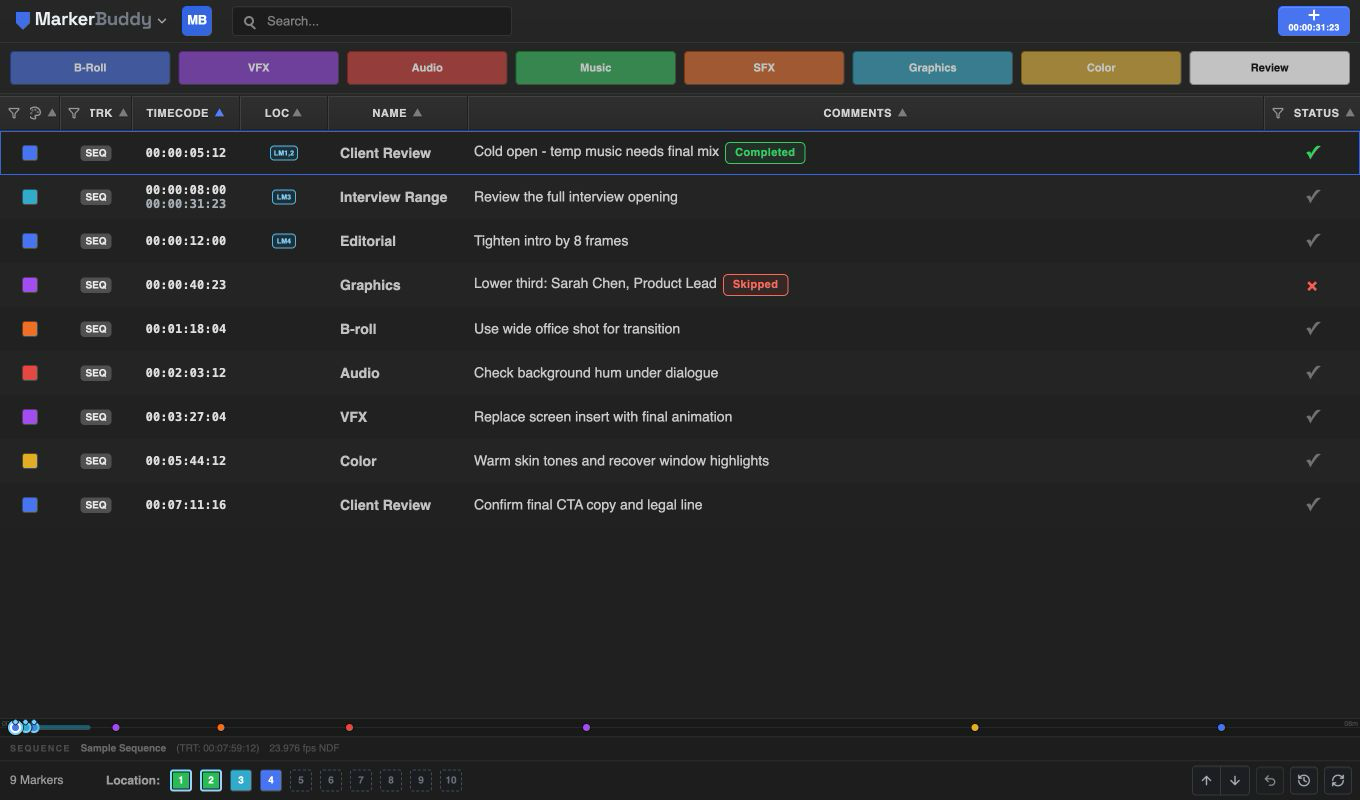
Eight editorial defaults. One click.
Start with B-Roll, VFX, Audio, Music, SFX, Graphics, Color, and Review, or customize any slot's name, color, comment, and clip or sequence placement.
Finish complex marker jobs without leaving one workspace.
Open one place for batch edits, reconforms, transcript searches, audio analysis, frame exports, clip sync, multicam markers, VFX pulls, text overlays, and Audition handoffs. Every tool shows you what it found before it changes the timeline.
Explore all 11 workflows →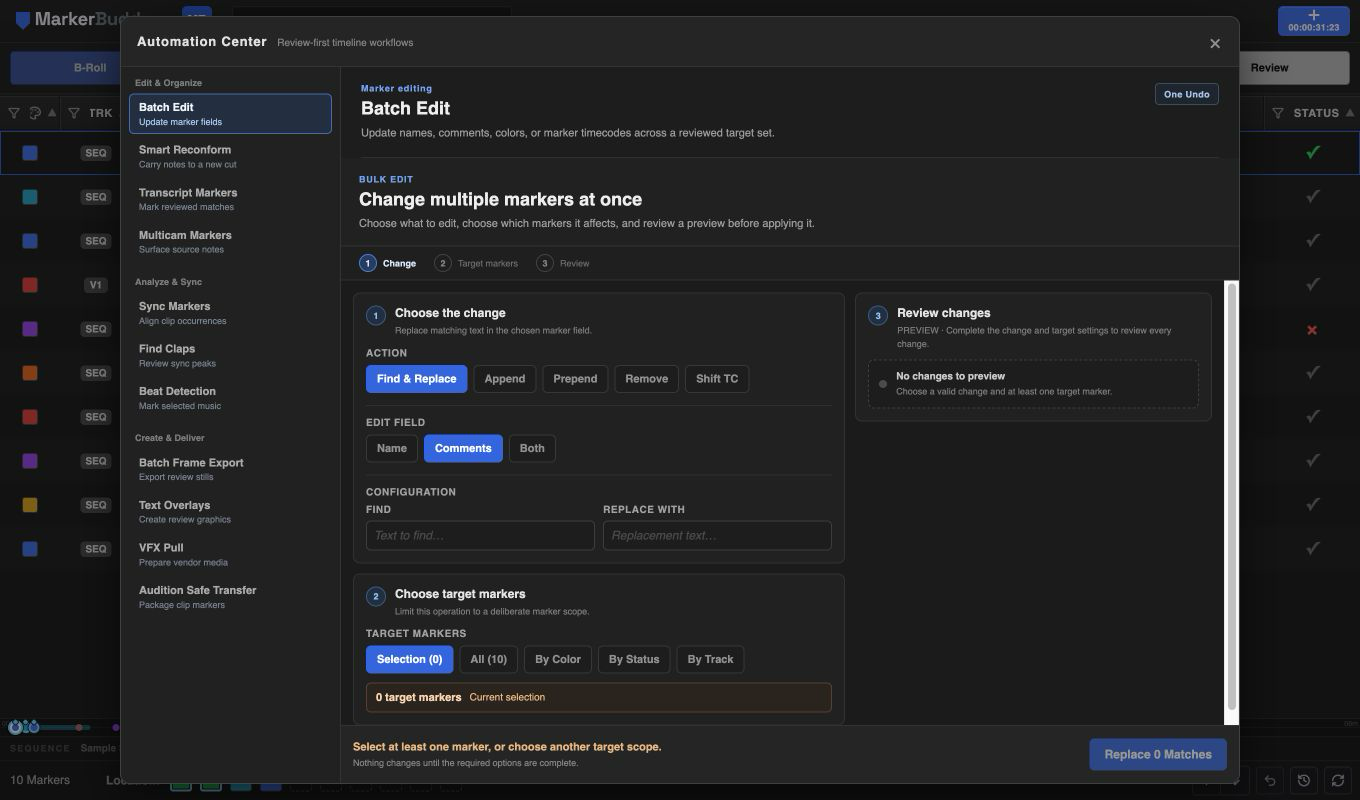
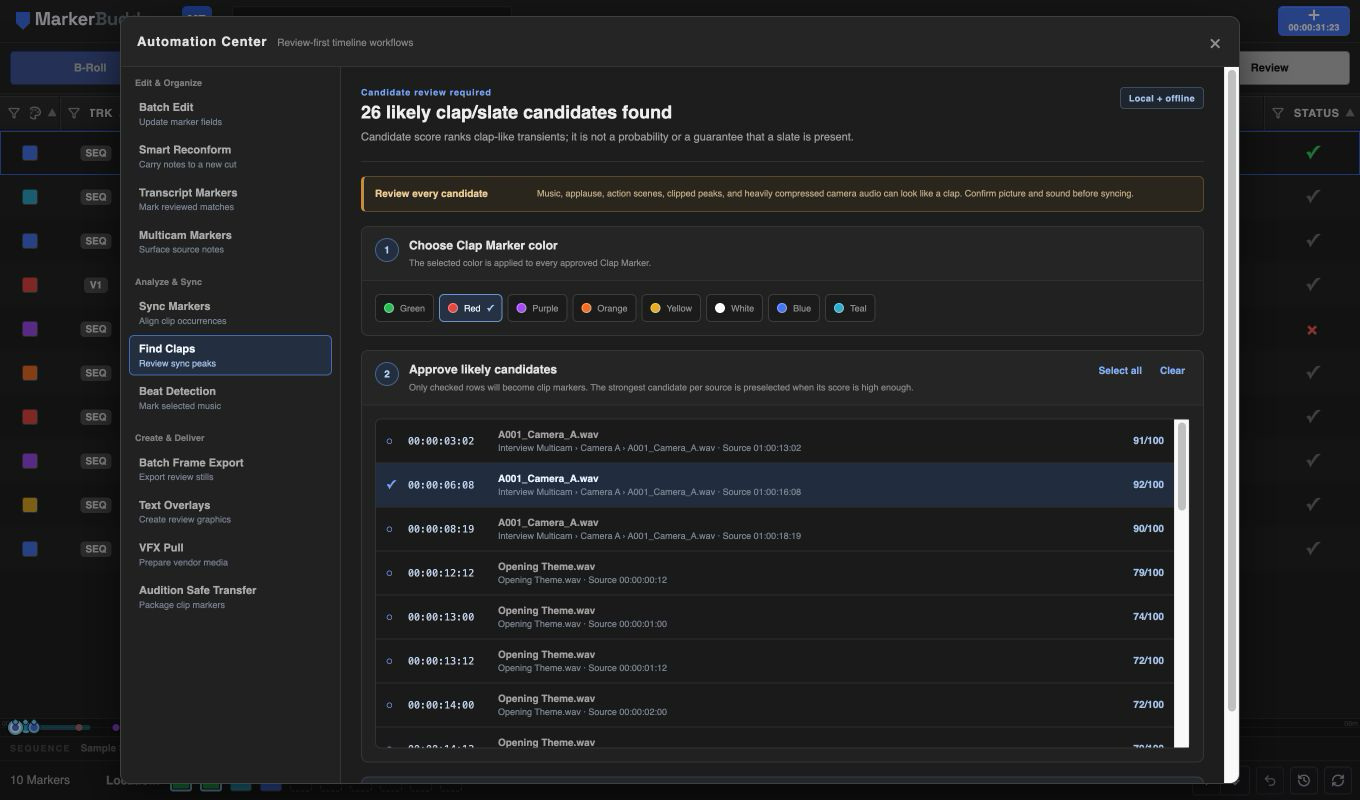
Find the strongest clap or slate moments in selected audio.
MarkerBuddy analyzes only the audio you select, ranks the most likely sync peaks, and lets you choose which ones become source markers. Everything stays local. Because music, applause, and action can look like claps, you stay in control of the final choice.
See how Find Claps works →Add beat markers to music without entering a BPM.
Select music clips and MarkerBuddy estimates the tempo, shows the proposed pulse, and lets you mark every beat, every second beat, or every fourth beat. Nothing is added until you choose the results, and no audio leaves the computer.
See how Beat Detection works →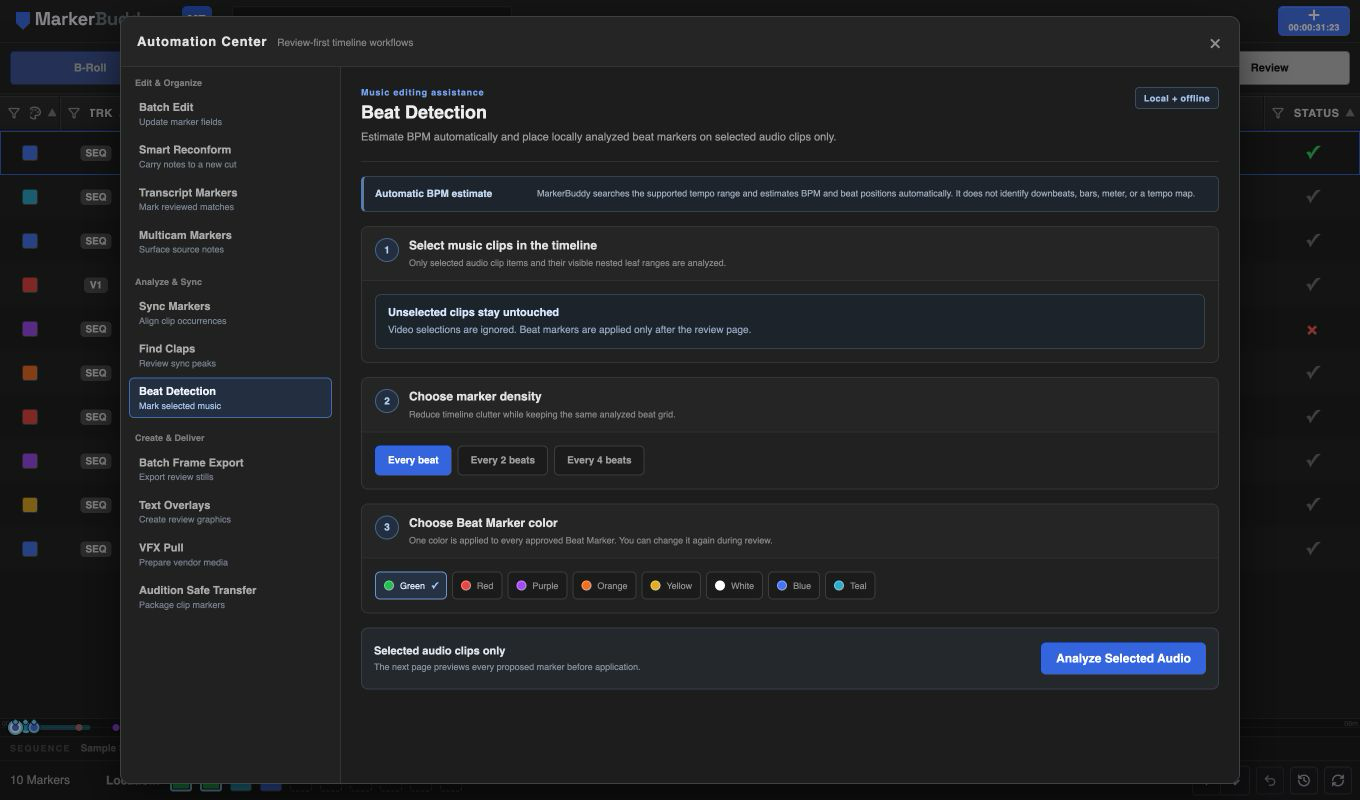
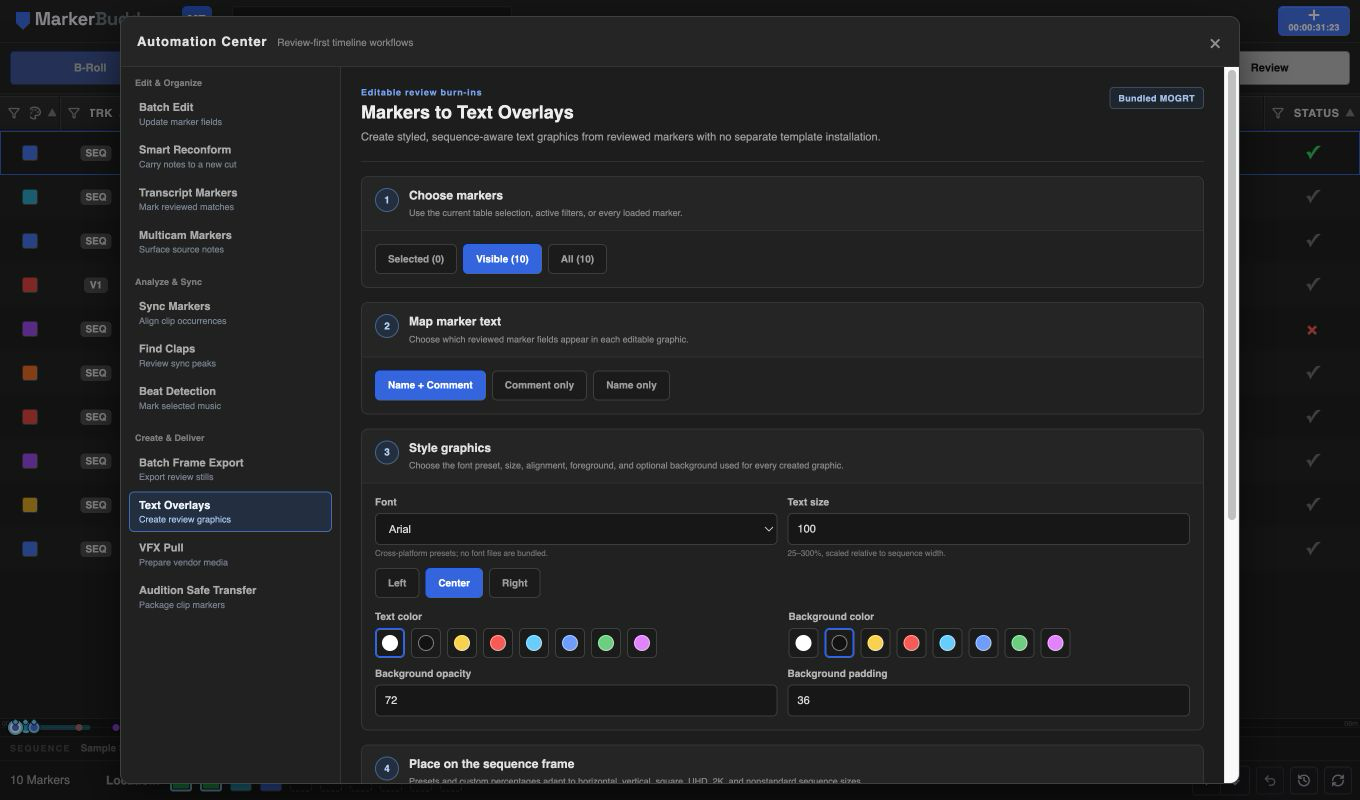
Turn marker notes into editable on-screen text.
Use marker names or comments to build editable graphics with the bundled MarkerBuddy template. Choose typography, colors, padding, and screen position; MarkerBuddy fits the active sequence, preserves marker timing, and avoids occupied tracks.
See how Text Overlays work →Send clip markers to Audition with audio and timecode intact.
Select timeline audio and export a local reference WAV with embedded BWF/XMP marker metadata, plus separate XMP, CSV, and JSON files. MarkerBuddy validates the package before delivery and never uploads the media.
See how Audition Safe Transfer works →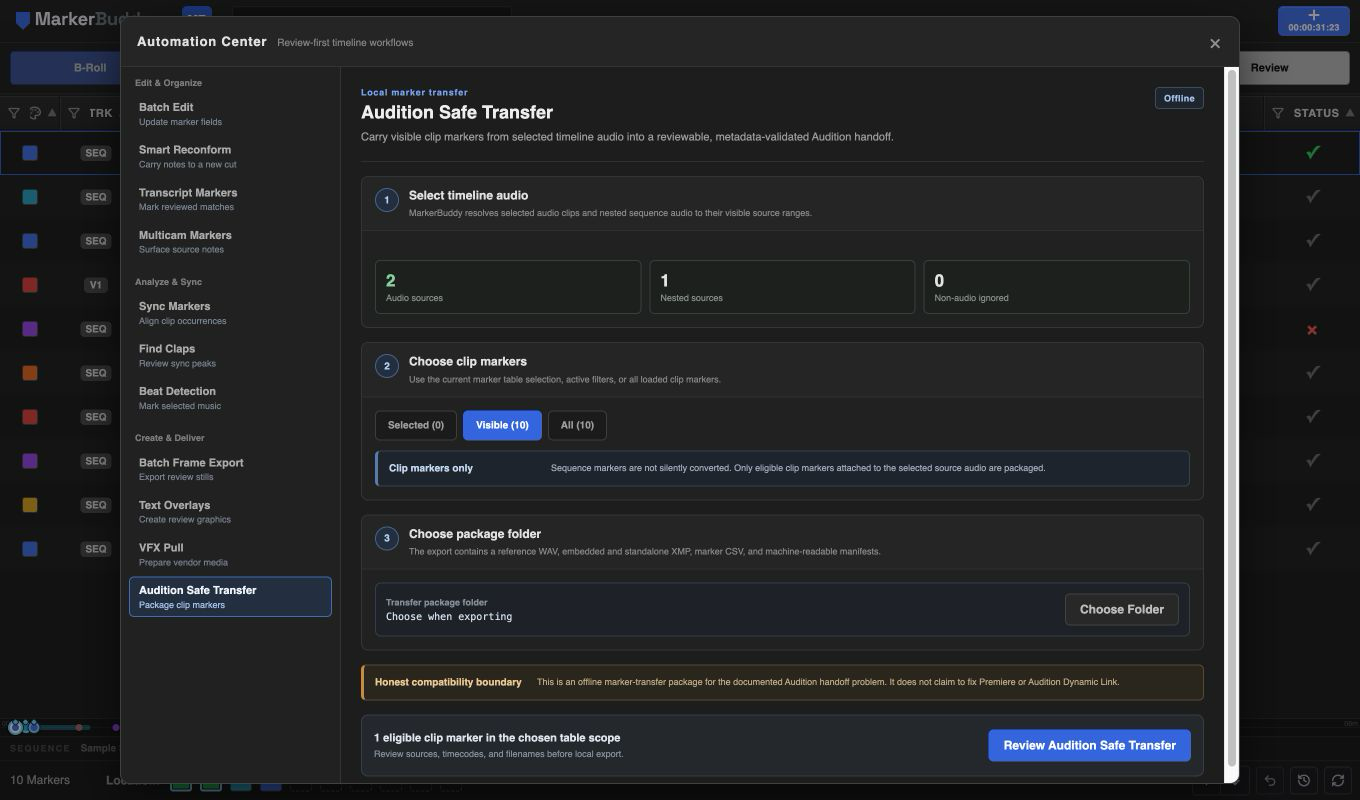
Send Premiere notes to the Pro Tools marker ruler.
Export selected or filtered Premiere markers as a marker-only AAF, then add them to an existing Pro Tools session with Session Data import.
Follow the Premiere to Pro Tools AAF workflow →Turn the right words into markers.
Inspect an existing Premiere transcript, filter exact speakers or unlabeled words, choose point or matched-phrase timing, then approve every result before MarkerBuddy writes anything.
Read the transcript marker workflow →Keep ten timeline locations one click away.
Assign or replace existing sequence or clip markers by dragging a row or using Set as Location Marker. A conditional LOC column appears after Timecode and centers LM badges, while cyan mini-timeline cues and matching Stream Deck actions keep every saved location one click away.
Read the Location Markers workflow →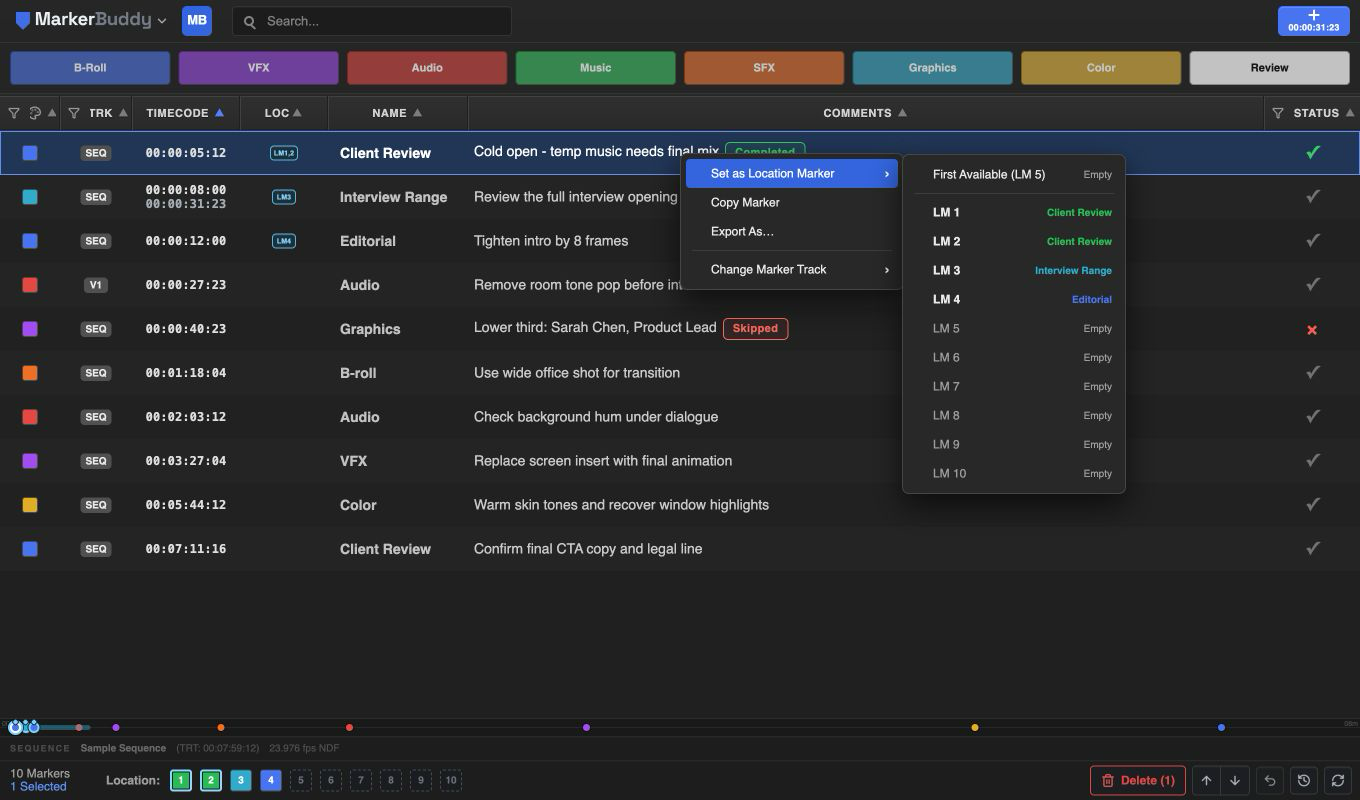
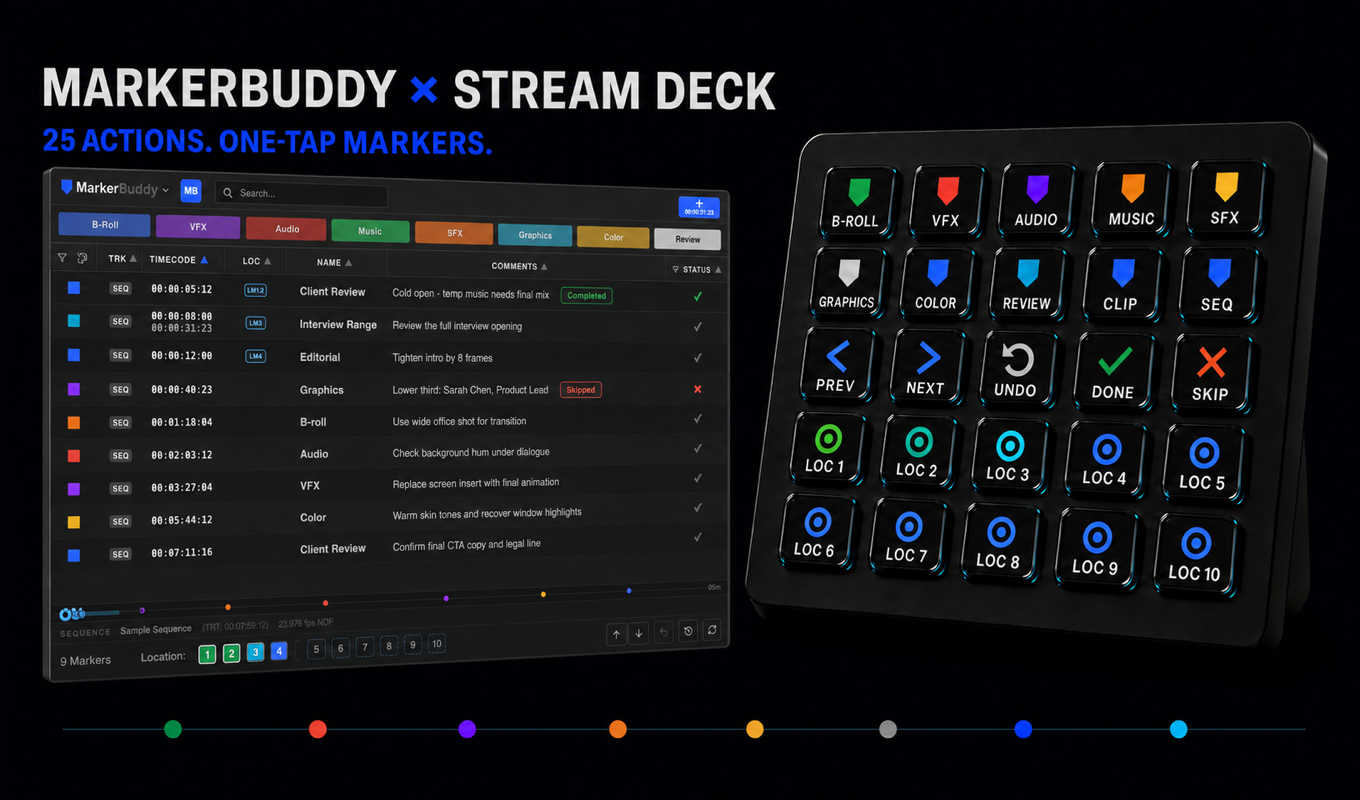
25 actions. One creative control surface.
Put B-Roll, VFX, Audio, Music, SFX, Graphics, Color, Review, marker navigation, Undo, statuses, and Location Memory 1-10 on physical keys. The integration stays local, with no cloud bridge or account.
Your timeline becomes the checklist.
Check off notes as you address them - MarkerBuddy stamps the completion time into the comment. Exclude the ones that don't apply. Filter to what's left, and you always know exactly how far from done you are.
See every marker at a glance.
A miniature map of your whole sequence that has colored dots for every marker sits at the bottom of the panel. Spot clustered notes, empty stretches, and click any dot to jump straight to it in the timeline.
Edit thirty markers like they're one.
Find and replace across names, colors, and comments, append or prepend text, or shift timecodes by any offset - scoped to your selection, a color, a status, a track, or everything. Previewed before you commit, applied as a single undoable step.
It reads what your clients send.
Paste text or drop a file - MarkerBuddy auto-detects the format and previews every parsed marker before anything touches your sequence. From polished exports to a messy email, it figures out what your client meant.
Markers out, to anywhere post lives.
Choose from 21 export formats, including the standalone, export-only Pro Tools Marker AAF for adding markers to an existing Pro Tools session without audio or video media. The PDF report can embed a captured frame at every marker.
MarkerBuddy keeps its own undo stack. Imports, batch edits, deletes, recolors - every operation is one entry, and you can roll back several at once. Destructive ops snapshot what they touch.
Markers that double up at the same position are flagged in the table, so importing round two of notes doesn't silently pile markers on top of round one.
Copy markers as spreadsheet-ready text, or paste them into a different sequence entirely. Notes travel with you from cut to cut, and Change Marker Track moves each marker to the timeline or an exact viable media destination.

"I cut television for a living. When I was moved from Media Composer to Premiere, marker handling was what I missed most - colors, naming, batch editing, and a real workflow for client notes. Nothing filled the gap, so I built it. MarkerBuddy is the answer to what post professionals need in Adobe."
Questions editors ask.
What do I need to run it?+
Premiere 25.6 or later, on macOS or Windows. MarkerBuddy is a UXP panel and ships as a standard .ccx add-on - double-click to install, restart Premiere, and open it from Window → Extensions (UXP).
Is this another subscription I have to buy?+
No. Pay once through the Adobe Creative Cloud Marketplace and you own it forever. Updates included.
My client's timecodes never match my sequence. Does that break the import?+
That's the most common case, and it's one field: set a TC Offset of ± HH:MM:SS:FF (e.g. −01:00:00:00 for notes taken against an hour-start export) and every imported marker shifts accordingly. Import presets remember it for next round.
Can MarkerBuddy add markers from a Premiere transcript?+
Yes. Search an existing Premiere speech-to-text transcript for one keyword or phrase, filter Premiere speaker IDs, choose point or matched-phrase timing, and create only approved markers on the active sequence or exact Source Monitor clip.
Does it handle clip markers or just sequence markers?+
Both, in one table - clip markers show a track badge (V1, A2, …). Change Marker Track moves a marker to the timeline or any viable video or audio destination from one right-click submenu.
Can I import Frame.io comments?+
Yes - export comments from Frame.io as JSON, CSV, or TXT and drop the file in (or paste). Format detection is automatic, and you get a full preview before committing.
What if an import goes wrong?+
MarkerBuddy keeps its own undo history, separate from Premiere's. Every import, batch edit, and delete is a single entry - click it to roll back. Destructive operations snapshot the markers they touch first.
Can I add custom keyboard shortcuts for different Quick Markers?+
Not yet - and it's not for lack of trying. The functionality is fully coded and ready to go, but it depends on a UXP integration that Adobe hasn't switched on. The moment Adobe enables it, per-slot keyboard shortcuts will work. MarkerBuddy's Stream Deck integration lets you assign Quick Markers 1-8 to physical Stream Deck keys now. See the Stream Deck setup and actions guide.
Is the internet needed for this plugin to work, or is my data sent to some cloud somewhere?+
MarkerBuddy is 100% offline - your markers, notes, and client emails never leave your machine. You'll only need an internet connection to buy and install it through the Adobe Creative Cloud Marketplace the first time.

The next round of notes doesn't have to hurt.
One panel, one price, every marker tool Premiere forgot.
Get MarkerBuddy on the Adobe Marketplace