Premiere's default marker shortcuts
These are the defaults. Open Keyboard Shortcuts in Premiere to check or change them.
- Add Marker: M
- Go to Next Marker: Shift+M
- Go to Previous Marker: Command+Shift+M on macOS, Ctrl+Shift+M on Windows
- Clear Selected Marker: Option+M on macOS, Ctrl+Alt+M on Windows
- Clear All Markers: Option+Command+M on macOS, Ctrl+Alt+Shift+M on Windows
What a Quick Marker adds
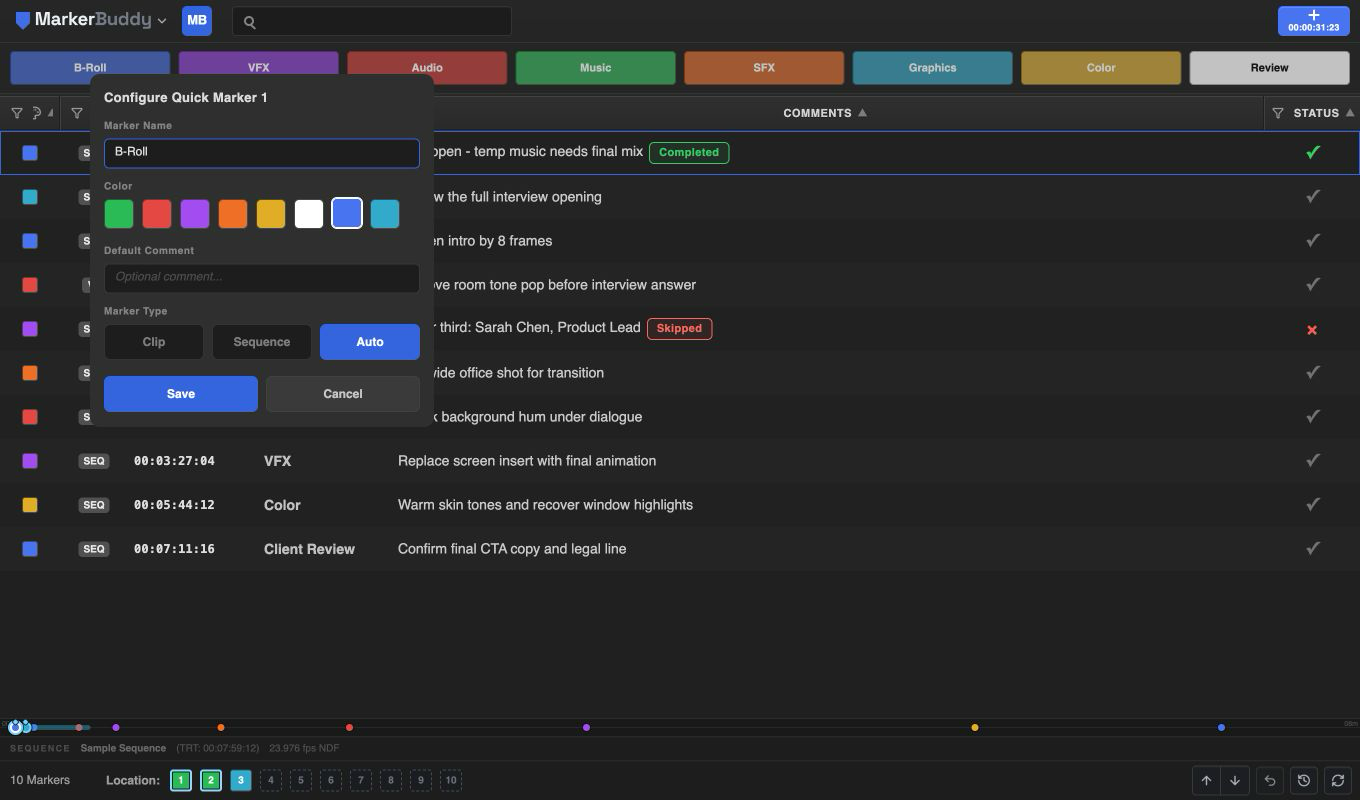
A Quick Marker is a button that stores a marker name, a color, a default comment, and whether it makes a clip marker, a sequence marker, or chooses automatically. One click adds that marker at the playhead. New installs start with four buttons: B-Roll, VFX, Audio, and Music. You can add up to 12.
Right-click a button to configure it. Auto-number adds a running number to each marker name. A Clip Quick Marker can mark the first video clip or the first audio clip under the playhead.
Switch button sets with presets
A preset is a saved set of Quick Marker buttons. MarkerBuddy Pro comes with Audio, Video, Color, and Story presets beside Default, and you can save your own, so the buttons match the job you are on.
Add Quick Markers without the mouse
MarkerBuddy commands cannot be assigned in Premiere's Keyboard Shortcuts window. To add a Quick Marker from a key, use the MarkerBuddy Stream Deck plugin, which has a key for each of the 12 Quick Markers.
Inside the panel, Command+A or Ctrl+A selects the visible markers, Command+C and Command+V (Ctrl on Windows) copy and paste markers, Command+Z or Ctrl+Z undoes, and Delete removes the selection.
Set up a Quick Marker
-
Add a button
Click Add in the Quick Markers bar.
-
Configure it
Right-click the button, then set Marker Name, Color, Default Comment, and Marker Type.
-
Save a preset
Choose Save Current as New Preset to keep the set.
-
Mark as you watch
Play the sequence and click a button at each moment you want to mark.
Where it helps
- Logging a screening without stopping to type
- Color passes with one button for each kind of fix
- Audio notes on the audio clip under the playhead
- Numbered notes with Auto-number
Which edition
Quick Markers and the Stream Deck plugin are part of MarkerBuddy Pro.
